

Revenue Growth Calculator: Revenue Growth Rate & Sales Growth
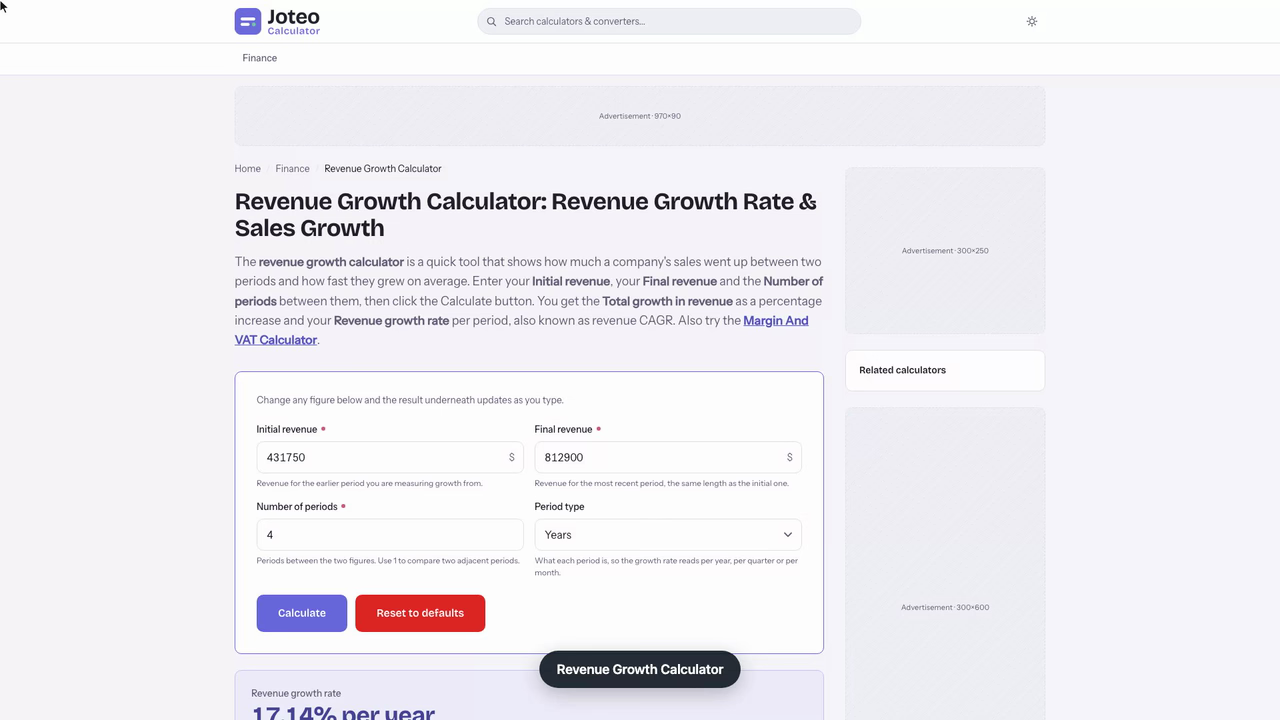
The revenue growth calculator is a quick tool that shows how much a company's sales went up between two periods and how fast they grew on average. Enter your Initial revenue, your Final revenue and the Number of periods between them, then click the Calculate button. You get the Total growth in revenue as a percentage increase and your Revenue growth rate per period, also known as revenue CAGR. Also try the Hhi Calculator.
Revenue Growth Calculator inputs and result
Revenue growth rate
—
- Total growth in revenue
- —
Table of contents
Who wrote and checked this page


Two revenue figures side by side rarely tell you much until you turn them into a rate. The revenue growth calculator takes your revenue from an earlier and a later stretch of time and returns how fast your sales are expanding as a percentage, plus the compound rate when you are looking across several years. Use it to spot trends early, set realistic targets and make data-driven decisions about hiring, spending and pricing, based on real revenue growth rather than a gut feeling.
What Revenue Growth Measures
Revenue growth is the change in a company's sales between two equal periods, expressed as a percentage of the earlier figure. Because revenue sits on the first line of the income statement, analysts often call it the top line, and its growth rate is the quickest signal of whether a firm is expanding, holding still or shrinking.
You can measure it over any matching window: year-over-year (YoY) for annual results, quarter-over-quarter (QoQ) for quarterly reports, or month-over-month (MoM) for a subscription firm tracking its MRR. The only rule is that both periods must be the same length, so a month is compared to a month and a year to a year.
A positive result means you sold more, a result of zero means they stayed flat, and a negative result is a decrease. That makes the same measure useful for a startup watching its first customers arrive and for a mature firm checking whether it is still winning market share from its competitors.
Sales Growth Rate Versus the Bottom Line
Your sales growth rate tells you how much more you sold, not how much more you kept. Revenue can climb 30% while net income falls if costs rise faster, which is why profit growth and profit margin deserve their own check next to the top-line figure. Treat a strong top-line rise as a necessary sign of health, never a sufficient one.
The Revenue Growth Rate Formula
Two formulas cover almost every question you will ask about revenue growth rates. The first compares two adjacent periods; the second smooths a longer run of results into one yearly rate. Both use the same inputs you would read off a sales report: the starting value (your earlier revenue) and the final value (your most recent revenue). See also our Margin And VAT Calculator.
Simple Growth Rate Between Two Periods
The basic revenue growth formula is a standard percentage increase calculation:
$$\text{Revenue growth} = \frac{R_{\text{current}} - R_{\text{previous}}}{\left|R_{\text{previous}}\right|} \times 100\%$$
Here \(R\) stands for the revenue of each period. Subtract the older figure from the newer one, divide by the absolute value of the older figure, then multiply by 100. Any percentage increase calculator uses this same arithmetic, and a revenue growth rate calculator simply labels the fields in financial terms. If the answer comes out below zero, you are looking at a percentage decrease, not an increase.
Revenue CAGR Across Several Years
When you have more than two data points, a simple percent increase from the first year to the last overstates how fast the firm grew each year. The compound annual growth rate (CAGR) fixes that by asking which single yearly rate, applied year after year, would turn the starting revenue into the final revenue:
$$\text{Compound rate} = \left(\left(\frac{R_{\text{final}}}{R_{\text{start}}}\right)^{\frac{1}{n}} - 1\right) \times 100\%$$
Here \(n\) is the number of periods between the two figures, usually full years. It is the same mechanism as compound interest: each year's increase builds on the higher base from the year before. Monthly data gives you the compounded monthly growth rate (CMGR) instead, and quarterly data gives the quarterly equivalent.
How to Calculate Revenue Growth: A Worked Example
Picture a regional furniture restoration business with five fiscal years of results. The owner wants to know how last year compares with the one before, and how quickly the company has grown over the whole stretch. Here are the figures and the year-by-year results.
| Fiscal year | Sales ($) | Change ($) | YoY change |
|---|---|---|---|
| 2021 | 431,750 | n/a | n/a |
| 2022 | 519,300 | +87,550 | +20.28% |
| 2023 | 598,640 | +79,340 | +15.28% |
| 2024 | 684,200 | +85,560 | +14.29% |
| 2025 | 812,900 | +128,700 | +18.81% |
Step 1, the latest year. The previous period is 2024 at $684,200 and the current period is 2025 at $812,900. The difference is $128,700, and $128,700 ÷ $684,200 × 100 = 18.81%.
Step 2, the full run. From 2021 to 2025 there are four full years, so \(n = 4\):
$$\left(\left(\frac{812{,}900}{431{,}750}\right)^{\frac{1}{4}} - 1\right) \times 100\% = 17.14\%$$
Across the same stretch the final revenue shows an 88.28% percentage increase on the 2021 figure, yet the revenue growth rate in compound terms is only 17.14% a year. That gap is exactly why you should never divide a multi-year total by the number of years: compounding makes the simple average misleading.

Reading the Year-by-Year Table
The table shows something a single revenue growth rate hides. The rate slowed from 20.28% to 14.29% over three years, which reads as decelerating, then jumped to 18.81% in 2025, which reads as accelerating again. Looking at the pattern alongside the headline number tells you whether the latest year is a new trend or a one-off, and it is the kind of detail a multi-period view is built to surface.
A Dental Practice Checks Its Quarterly Revenue Growth Rate Against a Hiring Trigger
It is the first week of October, and the practice manager at a three-chair dental clinic has one number to settle before the partners meet on Friday. Back in January they agreed to hire a second hygienist once quarterly revenue ran at least 12% above the same quarter a year earlier. Q3 has just closed, so this is the quarter that decides it.
She pulls two figures from the practice-management system's collections report: $347,815.60 for July to September 2024 and $389,462.35 for July to September 2025. She deliberately compares Q3 with Q3 rather than with Q2, because summer is when school-age patients book check-ups and the June quarter is always lighter.
Into the calculator they go: $347,815.60 as the previous period, $389,462.35 as the current one. The dollar change comes back as $41,646.75, and the year-over-year revenue growth rate as 11.97%.
That is 0.03 percentage points under the trigger. Multiplying last year's figure by 1.12 shows the target was $389,553.47, so the quarter missed by $91.12, less than the fee for a single filling.
She then strips out price. The clinic raised its fee schedule by 4.2% on 1 January 2025, so she divides 1.1197 by 1.042 and subtracts one: patient volume grew about 7.46%. Close to two-thirds of the headline growth came from more visits, not higher fees, which is the part a new hygienist would actually absorb.
Her note to the partners is short:
- Q3 revenue growth: 11.97% year-over-year, $91.12 short of the 12% trigger.
- Volume growth after the 4.2% fee rise: 7.46%.
- Proposal: rerun the calculation on 5 January with Q4 2025 against Q4 2024, and advertise the hygienist role that week if Q4 clears 12%.
Using the Revenue Growth Calculator for Any Period Length
You only need a few inputs to get an answer, and the order does not change:
- Enter the previous period revenue, the earlier figure you are measuring growth from.
- Enter the current period revenue, the most recent figure for a stretch of the same length.
- For revenue CAGR, add the number of periods between the two figures (years, quarters or months).
- Read the revenue growth rate as a percentage, plus the dollar change behind it.
The revenue growth calculator accepts any period length, but it cannot tell whether the figures you type in actually match. Comparing a full year to nine months, or a holiday quarter to a quiet one, produces a number that describes your data entry, not your trading.
Converting a Monthly Growth Rate to an Annual Growth Rate
Monthly and yearly rates are not interchangeable, because twelve monthly gains stack on each other. To convert, raise one plus the monthly rate to the twelfth power:
$$\text{Annual rate} = (1 + \text{monthly rate})^{12} - 1$$
A SaaS firm growing 3.2% a month is therefore growing about 45.93% a year, not 38.4%. Going the other way, the furniture business's 18.81% year works out to roughly 1.45% a month. For quarterly data, use a power of 4; a 4.6% quarter becomes an annualized rate of about 19.71%. Any sales growth calculator (or sales growth rate calculator) that reports monthly or quarterly results should show you this annualized figure too, so you can compare it with yearly targets.
Projecting Future Sales With a Growth Rate Calculator
Once you know your historical rate, you can project revenue growth forward by applying it to the latest figure. Projected revenue for year \(t\) is the latest figure grown at the compound rate \(g\):
$$R_t = R_{\text{now}} \times (1 + g)^{t}$$
At the furniture business's 17.14% compound growth rate, 2025's $812,900 becomes roughly $952,222 in 2026, $1,115,423 in 2027 and $1,306,594 in 2028. Treat this as a direction, not a forecast you can bank on: it assumes the next three years behave like the last four.

Building a Revenue Projection
A good revenue projection shows a range, not one line. Wider swings in your past results mean less certainty, so the confidence band around the estimate should widen for a volatile history and stay narrow for a steady one. Run the numbers at your best year's rate and your worst year's rate as well; for the furniture business, 14.29% and 20.28% bracket the central case.
Moving Averages, Regression and Bottom-Up Estimates
The compound-rate method suits a business with several years of consistent history. Companies with 12 or more months of data can also try moving averages, linear regression or exponential smoothing to reduce the pull of one unusual period. A young company with little history is better served by a bottom-up estimate: units you expect to sell multiplied by price, built from your pipeline rather than past results. Think of these methods as a check on the compound rate from the calculator: if a smoothed trend or a units-times-price figure lands far from the compound-rate estimate above, the historical rate is probably not a safe number to extend.
Sales Growth Benchmarks by Company Stage
A good revenue growth rate depends on how big and how old the business is. The same 18.81% revenue growth rate that looks healthy for an established retailer would worry the backers of a young software firm.
- Early-stage startups: revenue growth of 15-20% month-over-month is a common target, enough to roughly double sales every four to five months.
- Growth-stage companies: investors typically expect a growth rate of 50-100% or more year-over-year while the category is still being won.
- Established businesses: sustained revenue growth of 20% a year counts as high-growth; steady single-digit gains are normal and often respectable.
- Any stage: a falling growth rate for more than a year is a signal to dig into pricing, churn or market conditions.
Always report the dollar figures next to the percentage. Moving from $12,000 to $24,000 is a 100% jump but only $12,000 of new money, while double-digit growth on a large base can add more revenue than a small firm earns all year. Compare yourself against industry benchmarks and your own plan, not only against the fastest name in your sector.
Early-Stage Startups Versus Established Businesses
The difference comes down to the base. A small company can post triple-digit rates from a handful of new customers, while a large one has to add huge absolute sums to move the percentage at all. That is why a growth-stage firm is judged on speed and an established one on consistency; both use the same formula but read the result against different expectations.
Turning the Rate Into a Price Target
Investors use the rate this calculator returns as the first input to a valuation. Project the top line forward at that rate, multiply the result by a price-to-sales ratio, and you have an estimate of future market capitalization. Apply an expected margin instead and you get projected earnings, then EPS, and from there a price target for the stock price. A faster rate usually also lifts operating cash flow and free cash flow, which is why a steady rate tends to support a better return on investment, and why the stock market punishes a slowing rate even while it stays positive. For public companies, take both input figures from annual reports or SEC filings so the rate rests on audited numbers.
Mistakes That Distort Your Percent Change
The formula is simple, which makes it easy to feed it the wrong numbers. These are the errors that most often turn a correct calculation into a misleading one:
- Ignoring seasonality: comparing a strong fourth quarter with a slow third quarter shows a jump that vanishes next quarter; compare the same quarter across years instead.
- Mixing period lengths: revenue from a full year set against revenue from ten months will always understate growth.
- Using a negative base: if the earlier figure is zero or below zero, the percent change stops meaning anything, so report the absolute change instead.
- Skipping consistent data: keep the same accounting rules, the same currency and the same scope (with or without an acquired unit) in both periods.
- Treating one year as a trend: a single growth rate can hide volatility; track it across several years for a fair view of business performance.
Get the inputs right and the result becomes something you can act on: setting sales targets for your team, planning finance needs, or judging whether a marketing push actually moved sales revenue rather than just shifting it between months.
FAQs around Revenue Growth Calculator
1. How do you calculate revenue growth?
Subtract the earlier period's revenue from the later period's revenue, divide the difference by the earlier revenue, then multiply by 100. The result is the percentage increase (or decrease, if it is negative) between the two periods.
2. What is the revenue growth rate?
It is the average compound rate at which revenue grew per period across several periods. It uses the same formula as the compound annual growth rate: ((final revenue / initial revenue)^(1 / number of periods) - 1) x 100.
3. What is the difference between total revenue growth and revenue CAGR?
Total growth measures the full change between the first and last figures. Revenue CAGR spreads that change into one steady rate per period that accounts for compounding, so it is always smaller than total growth divided by the number of periods would suggest when growth is positive.
4. What is a good revenue growth rate?
It depends on the size and stage of the business. Early-stage startups often aim for double-digit growth month-over-month, growth-stage companies for 50-100% or more year-over-year, while established businesses growing around 20% a year are generally considered high-growth.
5. What does a negative revenue growth rate mean?
A negative result means revenue fell between the two periods. A single weak period can be seasonal, but a negative rate that persists is a warning sign worth investigating through pricing, customer churn or market conditions.
6. Should I compare monthly, quarterly or yearly revenue?
Any of them works as long as both figures cover periods of the same length. For seasonal businesses, compare the same quarter or month across years rather than back-to-back periods, so a holiday spike isn't mistaken for real growth.
7. Does revenue growth mean the business is more profitable?
Not necessarily. Revenue is the top line of the income statement, so sales can grow while net income shrinks if costs rise faster. Check profit growth and profit margin alongside revenue growth.
Report an issue with this page
Spotted a wrong result or unclear explanation? Report an issue or read our editorial policy.