

Sales Commission Calculator: Flat, Tiered and Split Pay
The sales commission calculator is a free tool that works out how much you earn on a sale from a commission rate or a tier table. Choose a calculation type, enter your sale amount, commission rate or tier rates and any base salary, then click the Calculate button to see your commission earned, the effective rate and your total earnings. Also try the Lifetime Earnings Calculator.
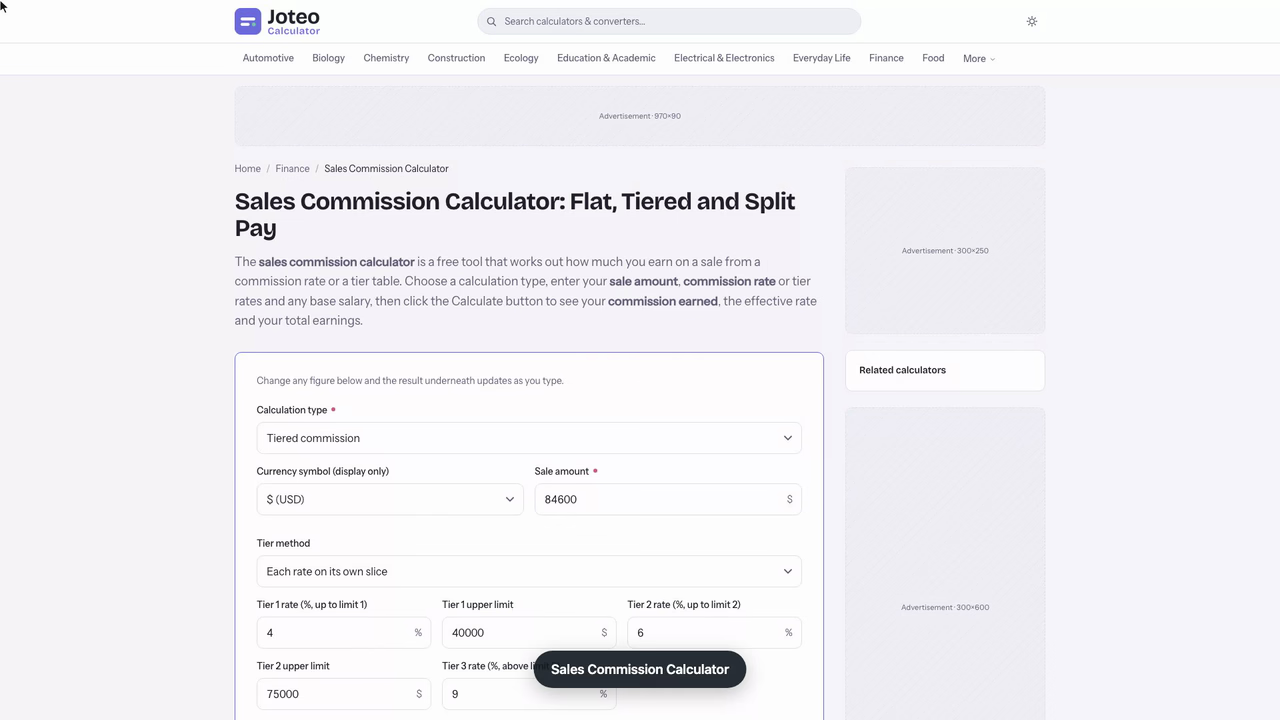
Sales Commission Calculator inputs and result
Commission earned
—
- Effective commission rate
- —
- Payout after bonus or draw
- —
- Total earnings (with base salary)
- —
- Commission per agent
- —
- You keep
- —
- Monthly commission
- —
- Quota attainment
- —
Results Table
Table of contents
Who wrote and checked this page


Use the sales commission calculator to turn a sale amount and a commission rate into the sales commission you actually earn, then see your total earnings once base pay is added. It handles one flat percent, stepped brackets or a shared deal, so you can check a pay plan before the payroll run does.
How the Sales Commission Calculator Works
Pick a mode, type in what your pay plan says and press the calculate button. Every one of the commission calculators people use follows the same loop: you supply the revenue, the rules are applied, and you read the payout. Sales reps can rerun it after every closed sales period. The tool only knows the numbers you enter, never your contract, so the plan wording always wins.
Flat Rate, Tiered and Split Modes
Flat mode applies one percentage to every eligible dollar. Tiered mode cuts the sale into slices and pays each slice at its own rate. Split mode divides a finished commission between people, such as a sales rep and a manager. Choose the mode that matches how your plan is worded, not the one that looks easiest.
Sales Commission Calculator Inputs and Results
- Sale amount: the closed deals your plan counts, in dollars.
- Rate or tier table: the commission rate, or each bracket limit with its own rate.
- Base pay and draw: optional fixed pay and any advance you must recover.
- Results: commission, the effective rate, and take-home pay after the draw.
Commission Formula for Flat Rate Commission
The commission formula is a single multiplication, and it works for any sale size:
$$\text{Commission} = \text{Sale} \times \frac{\text{Rate}}{100}$$With a flat rate commission, every dollar earns the same percent. A $63,400 sale at a 7.5% rate pays $4,755.00, and doubling the sale doubles the commission. That predictability is why one percent suits shops where sales are similar in size.
Straight Commission Pros and Cons
Straight commission pays nothing except the percent, so the incentive is direct and the motivation to close is high.
- Upside: easy to explain, and top sellers keep every extra dollar they earn.
- Downside: income swings with the month, which makes budgeting hard and can push reps toward quick discounts.
Eligible Revenue and Rounding
Plans differ on what counts. Some pay on invoiced revenue, others on cash collected, and a few on the gross sale price before discounts. Confirm which base your plan uses before you type anything in. The commission rounds to the cent, so a result such as $4,755.004 shows as $4,755.00.
Tiered Commission Brackets and Progressive Tiers
A plan with tiered brackets pays a higher percent as volume grows. Under progressive tiers, each tier bracket applies only to the slice of the sale that falls inside it, so the marginal rates climb without touching the dollars below.
Which Tiered Commission Method Does Your Pay Plan Use?
Your pay plan decides, and no calculator can read it for you. Under each slice at its own rate, crossing a limit raises the rate only on the extra dollars. Under rate reached on the whole sale, crossing a limit lifts the rate on every dollar, so one more sale can add a large jump. Ask your manager which one your pay plan describes before you trust a number. Even a small wording gap shifts what your sales earn.

Each Slice at Its Own Rate
$$\text{Commission} = \sum_{i}\,\text{Slice}_{i} \times \text{Rate}_{i}$$Each slice is the part of the sale between a bracket floor and its ceiling. Multiply it by that bracket rate, then add the lines together.
Base Pay Plus Commission Structure for Total Earnings
Most sales roles mix fixed and variable pay. With a base salary of $3,200 a month and $4,564 of commission, your total compensation for the month is $7,764. Strong sales performance lifts the variable half, never the base. The base salary covers rent in a slow month, and the commission rewards the strong one.
Draw Against Commission Explained
A draw is an advance paid before deals close. With a recoverable draw, any shortfall becomes a balance you repay from later checks, and a claw-back can reverse commission if a customer cancels. A non-recoverable draw is a guaranteed minimum that the company absorbs. A clawback clause works the same way, so read that wording too. Enter the draw as a deduction, because a draw against commission is not extra income.
Base Pay and Variable Pay Mix
Plans often split pay 60/40 or 50/50 between fixed and variable pay. A 60/40 split means on-target earnings of $8,000 would pair $4,800 of fixed pay with $3,200 of commission paid at full quota. A heavier variable side raises both the upside and the volatility.
Bonus and Gross Margin Commission Calculation
A bonus commission is a lump sum paid when a goal is met, such as ten new accounts in a quarter. It sits on top of the regular percent and is calculated separately, so enter it as its own line rather than blending it into the rate.
Calculating Gross Margin Commission
Instead of paying on the sale, this plan pays on profit: subtract the cost of the goods, then apply the rate. A $30,000 deal that cost $21,000 leaves $9,000 of profit, and a 12% rate pays $1,080. It rewards pricing discipline because a deep discount shrinks the pay.
Triggers, Kickers and SPIF Payments
A SPIF is a short contest prize tied to one product or one week. A trigger is the condition and a kicker is the extra paid when it is met. Enter each as its own line beside the calculated commission, since it rarely belongs inside the percent.
Quota Attainment and Accelerator Commission Rate
A sales quota is the revenue target your plan expects each sales period, and performance against it can change your rate. An accelerator raises the percent once you pass 100% of that goal, which rewards overachievement. Without one, a rep who doubles that goal earns exactly twice the commission, no more.
Reading Your Quota Attainment Percentage
Divide closed revenue by your goal. With $84,600 closed against a $70,000 quota, attainment is 120.9%. The extra 20.9% is the part that higher rate would normally pay at the higher rate.
Accelerators and Decelerators
A decelerator does the opposite below a floor: a plan might pay only half the rate under 70% of quota. Check for both, since sales performance below the floor changes a floor changes a weak month far more than a ceiling changes a strong one.
A Rep Checks Quarterly Sales Commission With an Accelerator
Dana, a software reseller rep, wants to know whether a $12,000 renewal that might slip into next quarter is worth chasing before the books close. Her sales quota is $240,000 for the quarter, and her commission plan pays 7% up to quota and 12% above it. I run her numbers through the sales commission calculator in tiered mode.
Her closed deals total $287,350, so quota attainment is 119.7%. The first $240,000 earns $16,800.00, and the $47,350 above quota earns $5,682.00 at the accelerator rate. Commission earned is $22,482.00, an effective rate of 7.82% on the sale amount, a figure I cross-check by hand: 7% of the whole $287,350 is $20,114.50, plus 5 extra points on $47,350 is $2,367.50, which lands on the same total.
| Scenario | Closed bookings | Commission |
|---|---|---|
| Renewal closes this quarter | $287,350 | $22,482.00 |
| Renewal slips to next quarter | $275,350 | $21,042.00 |
The sensitivity rerun is the useful part. The slip costs $1,440.00, which is exactly 12% of $12,000, not the 7.82% blended rate. The number to watch is the marginal rate above quota, because every dollar past 100% is paid at it, and that is where a late deal moves the payout most. At the IRS flat 22% supplemental wage rate her employer may withhold about $4,946 of federal tax from the full amount, so the check she banks is smaller than the figure on screen.
One caveat: the result is only right if her plan counts bookings in the quarter the invoice is dated, and a clawback clause could still reverse part of it if the customer cancels. So her next action is specific: ask finance for the renewal's invoice date before Friday, and confirm whether the accelerator applies to renewals at all.
Commission Split and Commission Earned by Each Side
A commission split divides one commission between parties. The calculator first finds the commission earned on the whole deal, then applies each share. Shares should add up to 100% of the pool, or someone is being paid twice.
Two-Sided Split With Your Broker
In real estate, a $4,564 commission with a 60% side share gives your side $2,738.40. A 70% split with your broker leaves you $1,916.88, and the office keeps $821.52. The three amounts add back to the side share.
Team Deal Pool Shares
For a team split, set the deal pool first, usually net revenue after discounts. Then enter each role's percent, such as account executive, engineer and manager, and read each share.
Worked Example: Commission Plan Payout for One Month
A rep closes $84,600 in a month with a $70,000 quota and $3,200 of base pay. The plan pays 4% up to $40,000, 6% from $40,000 to $75,000 and 9% above $75,000. This worked example shows each slice.
| Bracket | Sales in bracket | Rate | Commission |
|---|---|---|---|
| First $40,000 | $40,000 | 4% | $1,600.00 |
| $40,000 to $75,000 | $35,000 | 6% | $2,100.00 |
| Above $75,000 | $9,600 | 9% | $864.00 |
| Total | $84,600 | 5.39% effective | $4,564.00 |

Sales Commission Results Step by Step
- Split the sale into three slices at the limits.
- Multiply each slice by its own rate and add the lines to get $4,564.00.
- Divide by the sale to find the blended rate of 5.39%, below the 9% top rate because most dollars sat in lower brackets.
- Add the base pay to reach $7,764.00 for the month, using this sales commission calculator for each step.
For a property sale, enter the price and the agent's percent; the net to seller is the price minus that commission, so the tool answers the seller's side too.
Sensitivity: Changing One Input
Add $5,000 and the sale becomes $89,600. All $5,000 lands in the top bracket, so commission rises by $450 to $5,014.00. The method matters far more: if the 9% rate applied to the whole sale, the same $84,600 would pay $7,614.00, a gap of $3,050.00.
Why Accurate Sales Commissions Matter to Your Sales Team
A wrong figure costs trust faster than it costs money, so the calculator gives each employee and your payroll team one number to check against the pay statement. A reliable commission calculation also helps finance forecast cost and settle disputes over miscounted bookings at quarter end.
Choosing a Commission Structure
Pick the structure that fits your sales cycle and sales team size. Short, repeatable deals suit flat percents. Long, large deals suit tiers with accelerators, and shared deals suit splits. Run each candidate through the sales commission calculator before you commit.
Commission Tax and Withholding
Commission counts as supplemental wages in the United States, so your employer may withhold a flat 22% of federal income tax from it. The calculator shows pay before withholding, so subtract state levies and FICA yourself.
Common Mistakes to Avoid
- Averaging the brackets into one percent, which understates what you earn.
- Mixing invoiced and collected bases between months.
- Forgetting a draw or clawback deduction.
- Letting team shares add up past 100%.
FAQs around Sales Commission Calculator
1. How do you calculate sales commission?
Multiply the sale amount by the commission rate and divide by 100. A $63,400 sale at 7.5% pays $4,755.00. Tiered, split and quota plans apply the same idea to slices of the sale or shares of the result.
2. What is the difference between flat and tiered commission?
A flat plan pays one percent on every dollar. A tiered plan pays a higher percent as sales cross set limits, either only on the extra dollars or, in some plans, on the whole sale once a limit is passed.
3. Which tier method does my plan use?
Your pay plan states it. Under each rate on its own slice, a higher rate applies only above the limit. Under rate reached on the whole sale, crossing a limit lifts the rate on every dollar, which can create a large jump.
4. What is a draw against commission?
A draw is an advance paid before deals close. A recoverable draw is repaid from later commission, while a non-recoverable draw is a guaranteed minimum the company does not claim back.
5. What are quota attainment and an accelerator?
Quota attainment is closed sales divided by your quota. An accelerator is a higher rate paid on sales above that quota, so overachievement earns more per dollar.
6. Is sales commission taxed?
In the United States commission counts as supplemental wages, and an employer may withhold federal income tax at a flat 22%. State tax and FICA come on top. This tool shows pay before withholding.
7. Does the calculator include my base salary?
Yes. Enter fixed pay for the same period and the total earnings result adds it to your payout after any bonus or draw.
8. How is a commission split calculated?
The tool finds the total commission, divides it by the number of agents, and also shows what you keep after your side's share and your own split percent.
Report an issue with this page
Spotted a wrong result or unclear explanation? Report an issue or read our editorial policy.