

Markdown Calculator: Find Markdown Price and Percent
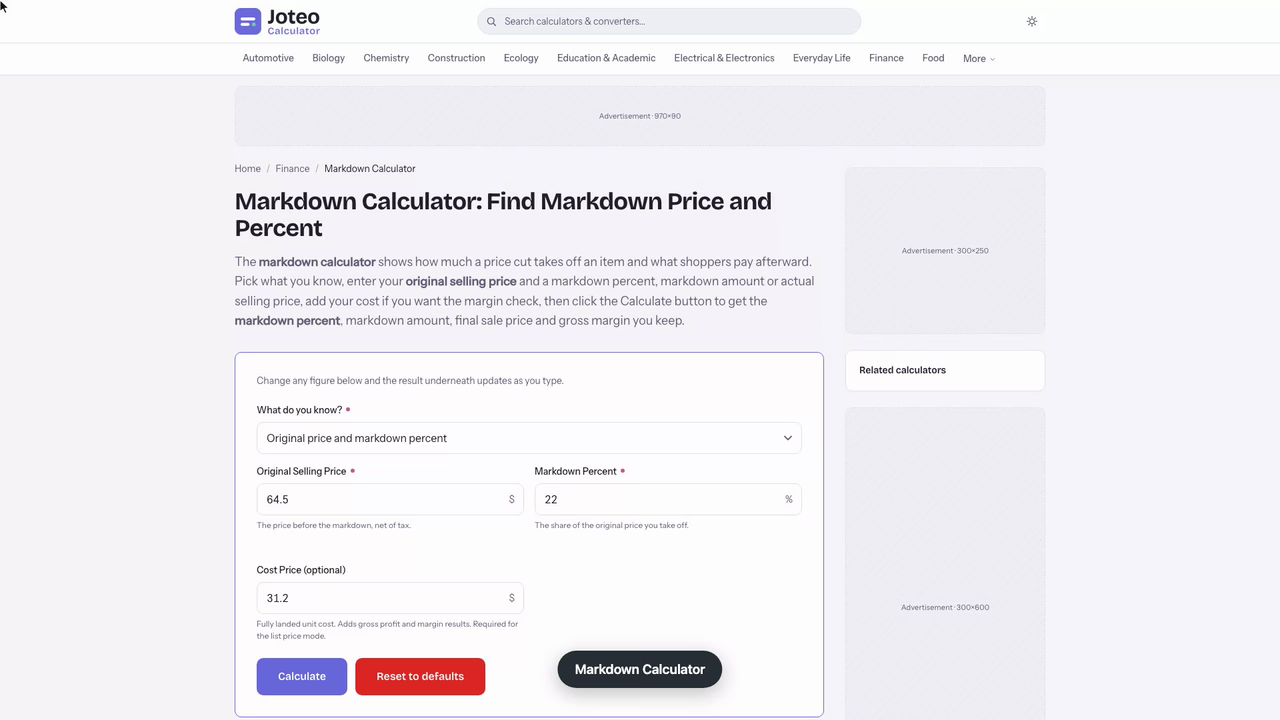
The markdown calculator shows how much a price cut takes off an item and what shoppers pay afterward. Pick what you know, enter your original selling price and a markdown percent, markdown amount or actual selling price, add your cost if you want the margin check, then click the Calculate button to get the markdown percent, markdown amount, final sale price and gross margin you keep. Also try the Double Discount Calculator.
Markdown Calculator inputs and result
Markdown Percent
—
- Markdown
- —
- Actual Selling Price
- —
- Original Selling Price
- —
- Markdown Depth
- —
- Gross Profit per Unit
- —
- Gross Margin (post-markdown)
- —
- Margin Points Lost vs Full Price
- —
- Margin Interpretation
- —
Table of contents
Who wrote and checked this page


Use this markdown calculator to see what a retail price cut costs you and what shoppers pay afterward. Enter the original price and a markdown percent, and it returns the markdown amount, the markdown price and the margin you keep, so a vague percent off becomes a clear number before you change a single tag.
What Is a Retail Markdown? A Price Reduction Defined
A retail markdown is a lasting price reduction a retailer takes when merchandise stalls at its starting tag. Shops use it to clear inventory after a seasonal peak, free up cash flow and make room for new stock. Clearance racks are the visible end of that pricing strategy. Unlike a coupon-style discount, which a business offers to chosen customers for a short time, a markdown changes the shelf figure for everyone. Every sale at the lower figure trades some margin for faster movement of inventory, so the size of the reduction deserves a number before you commit.
How the Markdown Calculator Uses Original Selling Price
The tool needs an original selling price and one more value: a percentage cut, a dollar cut or the actual selling price. Fill in two fields and the online markdown calculator solves the rest, returning the final selling price. Add your cost price, ideally the landed cost with freight and duty, and it also shows gross margin for a retail check. Enter figures before tax so the selling price you test matches your books and your sales reports.
Original Price vs Actual Price Inputs
The original price, also called the initial price, is the figure before any cut. The actual price is what a shopper pays now. Swapping them flips your result, so check which box holds which. Your cost is separate and only feeds the margin check.
Markdown Price Formula and Markdown Percentage
The markdown price formula subtracts the cut from the starting figure, and the percentage divides that cut by the starting figure:
$$M = P_o - P_s$$ $$M\% = \frac{P_o - P_s}{P_o} \times 100$$Here \(P_o\) is the original selling price and \(P_s\) is the price after the markdown. The denominator is always the original price, because the percentage describes how much of the old tag you gave up.
List Price Markdown to Protect Gross Margin
Planning ahead reverses the math. A list price markdown works backward from the cut you intend to allow, so the tag still leaves your target gross margin:
$$L = \frac{C}{(1 - g) \times (1 - d)}$$Here \(L\) is the tag, \(C\) is cost, \(g\) is the target margin and \(d\) is the cut.
To keep a 40% gross margin after a 22% markdown on an item costing $31.20, set the tag at $66.67. A gross margin calculator, a margin calculator, a markup calculator or a profit calculator covers the reverse view when you start from a tag instead.
Calculate Markdown Percent From Two Prices
Know the old and new price? Subtract, then divide by the old one. Going from $64.50 to $50.31 is a $14.19 cut, and 14.19 ÷ 64.50 = 22%. Dividing by $50.31 would claim 28.2%, a figure no price tag supports.
Worked Example: Calculate Markdown on a Sale Price
A shop tags a pair of leather walking shoes at $64.50 with a landed cost of $31.20. Late in the season, demand fades and the buyer decides on a 22% markdown. You enter 64.50 as the starting figure and 22 as the cut. The calculator returns $14.19 off and a new tag of $50.31. The shop holds 18 pairs, so the remaining inventory ties up about $562 at cost. The table shows how that choice compares with a lighter and a deeper cut on the same pair.

| Markdown depth | Cut | Sale price | Gross profit | Gross margin |
|---|---|---|---|---|
| 10% | $6.45 | $58.05 | $26.85 | 46.3% |
| 22% | $14.19 | $50.31 | $19.11 | 38.0% |
| 40% | $25.80 | $38.70 | $7.50 | 19.4% |
A price elasticity guess then decides which row pays: a deeper cut only wins if extra unit sales outweigh the lost margin per pair, and total retail revenue only rises if units sold climb with it.
Markdown Amount and Gross Profit Left Per Unit
At the new figure, gross profit per pair is $50.31 − $31.20 = $19.11, a margin of 38.0% on sales. Before the cut it was 51.6%, so the markdown surrendered 13.6 points. The margin math divides by the post-cut figure, which is why it moves faster than the cut itself; the retail P&L feels it first.

Finding the Markdown Price That Clears Helmets Above the MAP Floor
Dana runs a small cycling shop and has 14 last-season helmets left. They are tagged at $84.95 with a landed cost of $46.10, and the new model arrives in six weeks. Her supplier's minimum advertised price (MAP) policy sets a floor of $64.99, so the real question is how deep she may cut without breaking that rule.
Dana's first instinct is 25% off. She types 84.95 as the original price, 25 as the markdown percentage and 46.10 as cost. The calculator returns $63.71, which is $1.28 under the MAP floor. She checks it by hand: 84.95 × 0.75 = 63.71. The same arithmetic gives the ceiling: (84.95 − 64.99) ÷ 84.95 = 23.5%, so 23% is the deepest legal cut.
At 23% the calculator shows a markdown of $19.54, a sale price of $65.41 and gross profit of $19.31, a gross margin of 29.5% against 45.7% at full price. Her sensitivity rerun changes only the percentage:
| Markdown | Sale price | Gross margin |
|---|---|---|
| 20% | $67.96 | 32.2% |
| 23% | $65.41 | 29.5% |
| 25% | $63.71 | 27.6% |
The number I would watch is the margin per helmet, not the markdown label: each point of depth costs about $0.85 of profit here. Break-even sits at 45.7% off, where the price equals cost, so Dana has room, but the MAP floor binds long before cost does.
Now the trap. Her checkout system has a 10% newsletter coupon, and stacking it on $65.41 gives $58.87. That is a combined 30.7% off, not 33%, and it lands below the MAP floor again, with margin down to 21.7% and only $12.77 profit. The calculator can't see stacked coupons, so she enters the final price as the actual selling price and reads the percentage it returns. Her decision: price the helmets at 23% off, exclude them from the coupon, and re-run the figures after two weeks. If fewer than half are gone, she bundles them with a light instead of cutting deeper.
Markdown Pricing: Planned Markdown and Sell-Through Rate
Markdown pricing works best as a schedule, not a reaction. A planned markdown fixes when a cut happens and how deep it goes, so a buyer can forecast the maintained margin for the whole season instead of being surprised at the end. Trigger the first cut from the sell-through rate: when sell-through trails plan, a shallow early move costs less than a deep markdown depth taken late. Check the result against GMROI and inventory turnover, and keep open-to-buy in step with the inventory left. A weak GMROI on aged inventory is the usual warning, and retail buyers who track it cut earlier. The buyer is really trading demand against profit.

Markdown vs Discount and Markup
A markdown lowers the posted price for everyone; a discount is usually a temporary offer for a group. A markup works from cost instead: profit ÷ cost, while margin is profit ÷ price. The same $31.20 cost and $64.50 tag give a 106.7% markup but a 51.6% margin, so keep the two apart. Any cut you set should state which base it uses, and the new price must clear your cost.
Common Mistakes When You Calculate Percent Off
- Wrong denominator: divide by the lower tag and a 22% markdown reads as 28.2%, which will not reconcile with the P&L.
- Stacking cuts: two 20% markdowns in a row give 36% off the initial price, not 40%.
- Ignoring cost: a promotional tag price can look fine while revenue minus cost leaves almost nothing.
- Forgetting tax: test the shelf price before tax, then add it back for the customer.
- Treating every stock line alike: retail clothing and shoes tied to a season need earlier cuts than basics, and slow sales are the signal.
FAQs around Markdown Calculator
1. What is a markdown in retail?
A markdown is a permanent reduction of an item's selling price, taken when it is not selling at the original price. Retailers use it to clear inventory, free up cash flow and make room for new stock.
2. How do I calculate the markdown percentage?
Subtract the new price from the original price, divide the result by the original price and multiply by 100. For example, a cut from $64.50 to $50.31 is $14.19, and 14.19 / 64.50 = 22%.
3. How do I find the sale price after a markdown?
Multiply the original price by (1 - markdown percent). A 22% markdown on $64.50 leaves 64.50 x 0.78 = $50.31.
4. What is the difference between a markdown and a discount?
A markdown is a lasting cut to the shelf price that applies to every customer. A discount is usually a temporary offer, such as a coupon or member price, applied at checkout for a particular group.
5. Why divide by the original price and not the sale price?
The percentage describes how much of the old price you gave up, so the original price is the base. Dividing by the lower sale price overstates the markdown and will not reconcile with your profit and loss figures.
6. How does a markdown affect gross margin?
Gross margin is gross profit divided by the selling price, so a markdown lowers both profit per unit and the margin percentage. Enter your cost price in the calculator to see the margin points you give up.
7. What is the difference between markdown and markup?
Markup raises a price above cost and is measured against cost. A markdown lowers a price from its original level and is measured against the original price. The same prices give different percentages under each.
8. How do I set a list price that still allows a markdown?
Choose the list price mode, then enter your cost, the gross margin you want to keep and the markdown you plan to allow. The calculator returns the list price, which equals cost / ((1 - margin) x (1 - markdown)).
Report an issue with this page
Spotted a wrong result or unclear explanation? Report an issue or read our editorial policy.