

GTIN Check Digit Calculator: UPC, EAN and GTIN-14
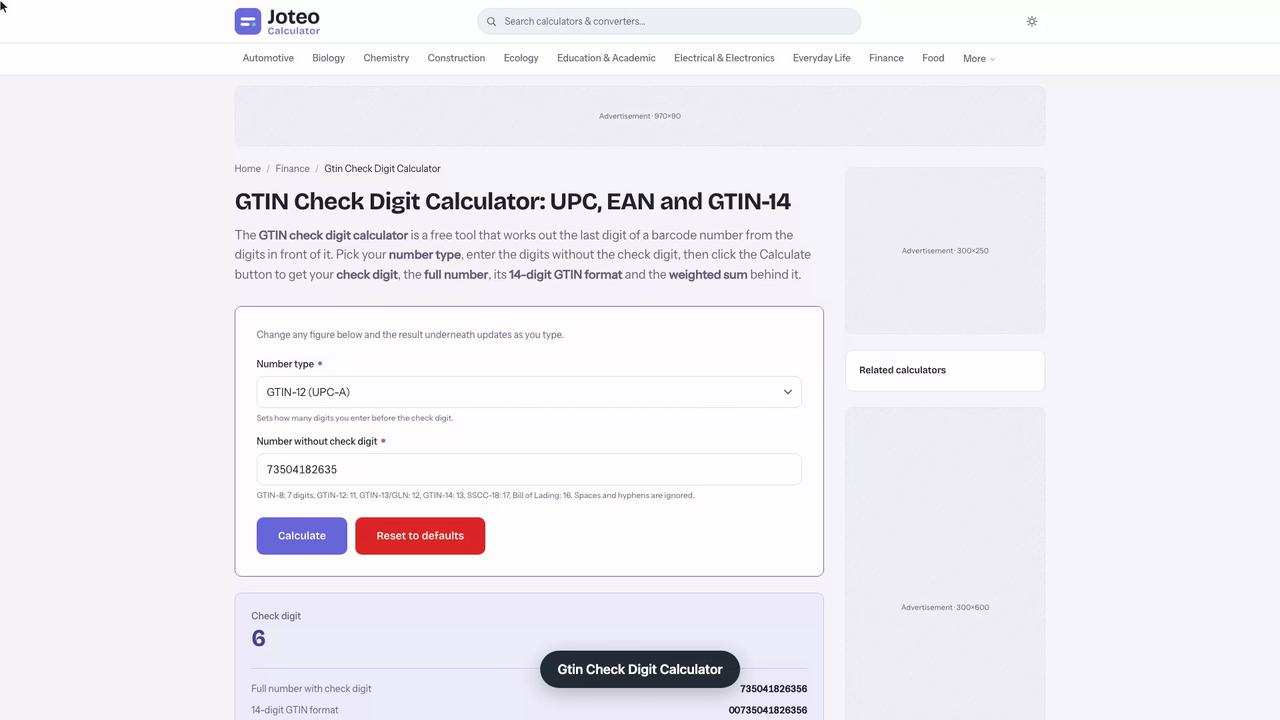
The GTIN check digit calculator is a free tool that works out the last digit of a barcode number from the digits in front of it. Pick your number type, enter the digits without the check digit, then click the Calculate button to get your check digit, the full number, its 14-digit GTIN format and the weighted sum behind it. Also try the Markdown Calculator.
Gtin Check Digit Calculator inputs and result
Check digit
—
- Full number with check digit
- —
- 14-digit GTIN format
- —
- Weighted sum
- —
- Result
- —
Table of contents
Who wrote and checked this page


Use this GTIN check digit calculator to find the last digit of a UPC-A, EAN-13 or GTIN-14 code: enter the leading digits and you get back a well formed barcode number that scanners and GS1 systems accept. The free check digit calculator logic below is the same one behind every barcode on a retail shelf, so you can also work it out on paper.
How the GTIN Check Digit Calculator Works
Every GTIN ends in a check digit derived from the data digits in front of it. The rule is modulo-10: apply alternating weights of 3 and 1 to the code, starting from the position nearest the end, add the products, and choose the digit that lifts the total to the next multiple of ten.
$$\text{check digit} = \left(10 - (\text{sum} \bmod 10)\right) \bmod 10$$The same modulo 10 rule covers every GTIN length, which is why one GTIN calculator handles them all. The weight 3 always sits at the right-hand end of the code, so padding a code with zeros on the left never changes the result. GS1, the standards body behind these numbers, publishes the rule for every length.
Weights, Weighted Sum and Modulo-10
The total of each digit times its weight is the weighted sum. Because the weights repeat 3, 1, 3, 1, a swapped pair of neighbouring digits usually changes the total, and that is what makes the check useful on printed barcodes.
Calculate the Check Digit by Hand
- Write the numbers and set the weights 3, 1, 3, 1 from the right.
- Multiply each one by its weight and add the products.
- Subtract the sum from the next round ten; the gap is your answer.
This is how you calculate check digit values without any software, and it is also the quickest way to confirm what the tool returns.
Length matters when you enter a code. A short EAN-8 needs 7 digits, UPC-A needs 11 digits, EAN-13 needs 12 digits and a case code needs 13 digits before the check; a pasted string with the wrong count is the first thing to rule out when a result looks off.
Worked Example With a UPC-A Barcode Number
Take the eleven-figure stem 73504182635. Reading from the left, the UPC-A weights run 3, 1, 3, 1 and so on, ending on 3 at the final position.
| Position | 1 | 2 | 3 | 4 | 5 | 6 | 7 | 8 | 9 | 10 | 11 |
|---|---|---|---|---|---|---|---|---|---|---|---|
| Figure | 7 | 3 | 5 | 0 | 4 | 1 | 8 | 2 | 6 | 3 | 5 |
| Weight | 3 | 1 | 3 | 1 | 3 | 1 | 3 | 1 | 3 | 1 | 3 |
| Product | 21 | 3 | 15 | 0 | 12 | 1 | 24 | 2 | 18 | 3 | 15 |
The products total 114, the next ten up is 120, so the check digit is 6 and the full UPC is 735041826356. Add a leading zero and the EAN-13 becomes 0735041826356; the leading zeros add nothing to the sum, so the same 6 stands. Weighting from the right instead gives the same total of 114, which confirms the stem. This is the worked example every converter between UPC and EAN relies on.

GTIN Converter Rules for GTIN-8, GTIN-12, GTIN-13 and GTIN-14
A Global Trade Item Number comes in four lengths, and each one identifies a trade item at a different level. Converting between them means padding with zeros and recalculating only when an indicator is added.
| Format | Length | Typical use |
|---|---|---|
| GTIN-8 (EAN-8) | 8 | Small packs |
| GTIN-12 (UPC-A) | 12 | North American stores |
| GTIN-13 (EAN-13) | 13 | Worldwide stores |
| GTIN-14 | 14 | Cartons and cases |
The leading part of the code is a company prefix issued by a GS1 member organization to the company that owns the brand, and it says nothing about where the goods were made. Printed barcodes at each level carry the same final digit logic.
UPC-E Zero Suppression
UPC-E squeezes a UPC-A into eight symbols through zero suppression, and its final data digit tells a barcode scanner which zeros to restore. A number system digit of 0 or 1 comes first. Take UPC-E 0 523412 1: the last data digit is 2, so the scanner rebuilds UPC-A 052200003411. Always expand a UPC-E code to twelve places before you check it, because the printed check digit belongs to the expanded UPC-A, not to the short form.
The GTIN-14 Indicator Digit
The indicator digit in front of a GTIN-14 marks a packaging level, such as a carton holding a dozen items. Changing it changes the weights on every other position, so the case code needs its own check digit rather than a copy of the item's.
A Twelve-Pack Case Code Built as a GTIN-14
Dana runs fulfilment for a small soap maker, and a retailer will only take twelve-packs once each carton has its own code. The item already carries EAN-13 5060317492856, and the retailer's portal asks for a GTIN-14 at the next packaging level. To calculate the check digit, I'd open the GTIN check digit calculator and enter the first twelve figures of the item with the indicator 3 in front: 3506031749285.
The alternating weights give a total of 83, the next multiple of ten is 90, so the check digit is 7 and the case code is 35060317492857. The item's own final 6 cannot be reused, because the indicator digit shifts every weight. A plain GTIN converter that only pads zeros would miss that.
| Indicator | Weighted total | Final digit |
|---|---|---|
| 1 | 77 | 3 |
| 2 | 80 | 0 |
| 3 | 83 | 7 |
| 4 | 86 | 4 |
The rerun is the useful part. Moving the indicator from 3 to 4 changes the total to 86 and the digit to 4, so a carton printed with the wrong packaging level fails at the scanner. The input I would watch is that leading indicator, because it is the only figure that differs between case sizes of one product. A check digit generator returns the same numbers, which is how Dana cross-checked by hand.
One edge case matters. The result only shows the code is well formed; marketplaces and the retailer's product database still test the company prefix against the GS1 licence. And typing 506 as 056 still returns 7, since 5 and 0 differ by exactly 5, so Dana reads the finished code aloud against the label before printing.
GLN, SSCC and ISBN Validation Beyond a Barcode
The same rule validates a GLN (13 places, a location identifier) and an SSCC (18 places, a shipment container). For the GLN stem 429180600437 the weights give a sum of 72, so the final digit is 8 and the GLN reads 4291806004378. Manufacturers and retailers follow the GS1 General Specifications for these identifiers, and any GLN check should run the same way as a GTIN check. ISBN-13 follows the same rule, so this calculator covers it too.
Common Mistakes and Where a Valid Result Falls Short
A valid check digit proves the number is well formed, not that a brand owner licenced it. Marketplaces compare codes against the GS1 licence, so an invented code can be rejected even when the arithmetic works. Check the number against your product database as well.
- Entering the finished code along with the stem, which shifts every weight.
- Dropping leading zeros when a spreadsheet stores the code as a number.
- Assuming the prefix shows the country of origin.
- Mixing up a GLN with an item code of the same length, since both pass the same arithmetic.
Careful entry avoids transcription errors in product data. A barcode check digit also cannot catch every slip: two neighbouring figures that differ by exactly 5 can swap places without changing it. If you need to calculate the check digit for a long list, use a check digit generator that accepts pasted batches, and keep the GS1 prefix records with the file.

FAQs around Gtin Check Digit Calculator
1. What is a GTIN check digit?
It is the final digit of a GTIN, calculated from the digits before it, so a scanner or database can tell whether the number was typed or read correctly.
2. How do you calculate a GTIN check digit by hand?
Starting at the digit next to the check digit and moving left, multiply by 3, 1, 3, 1 and so on, add the products, then subtract the total from the next multiple of ten. The difference is the check digit.
3. Do UPC-A, EAN-13 and GTIN-14 use the same rule?
Yes. All GTIN lengths use the same modulo-10 rule with alternating weights of 3 and 1 from the right, so only the number of digits changes.
4. Does adding a leading zero to a UPC-A change its check digit?
No. A leading zero turns a UPC-A into an EAN-13 and carries no weight in the sum, so the check digit stays the same. Adding a GTIN-14 indicator digit does change it.
5. Does a valid check digit prove a barcode is genuine?
No. It shows the number is well formed. Whether the code was issued to a product is recorded with the brand owner's GS1 licence.
6. Can I make up my own GTIN?
No. GTINs come from a GS1 company prefix licensed to the brand owner, and marketplaces check them and may reject invented codes.
7. How many digits should I enter?
Enter the number without its check digit: 7 digits for GTIN-8, 11 for GTIN-12, 12 for GTIN-13 or a GLN, 13 for GTIN-14 and 17 for SSCC-18.
Report an issue with this page
Spotted a wrong result or unclear explanation? Report an issue or read our editorial policy.